Telegram
A bot posts to a private chat, a group or a channel. You need the bot token from @BotFather and the chat id.
Self-hosted latency monitoring
Driftband draws smoke graphs: every ping of every cycle as percentile bands, with a median coloured by packet loss. The way SmokePing taught a generation of network engineers to read a link, rebuilt with a web interface, organizations, two-factor sign-in, alerts that don't spam and an audit trail.
Simulated in your browser with the same maths Driftband uses on real probes. Hover the graph to read a cycle.
01 / Why smoke
A link that answers in 10 ms most of the time and 180 ms now and then has a fine average and an awful user experience. Driftband keeps every round-trip time of every cycle and shows you where they fall.
02 / Real screens
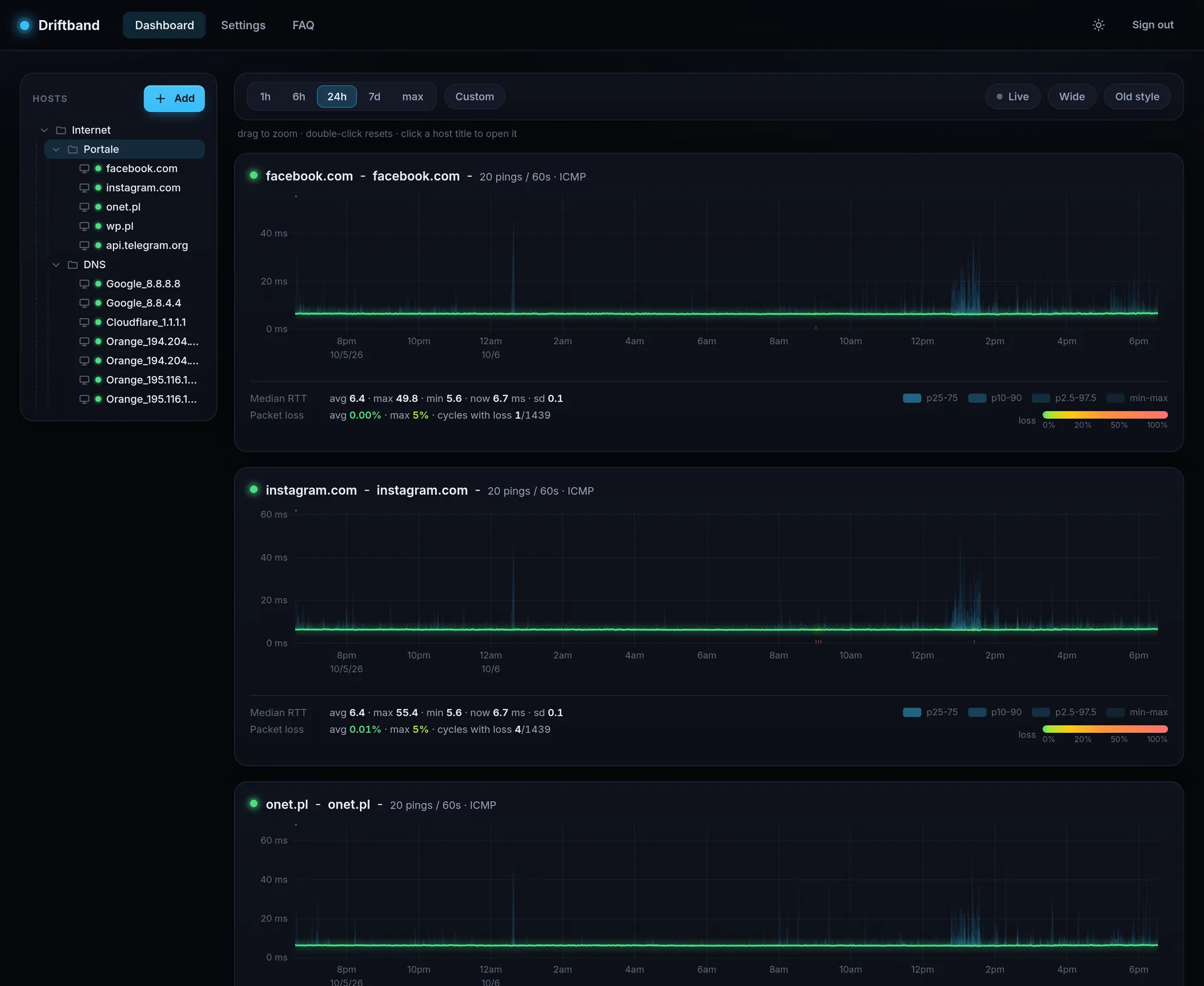
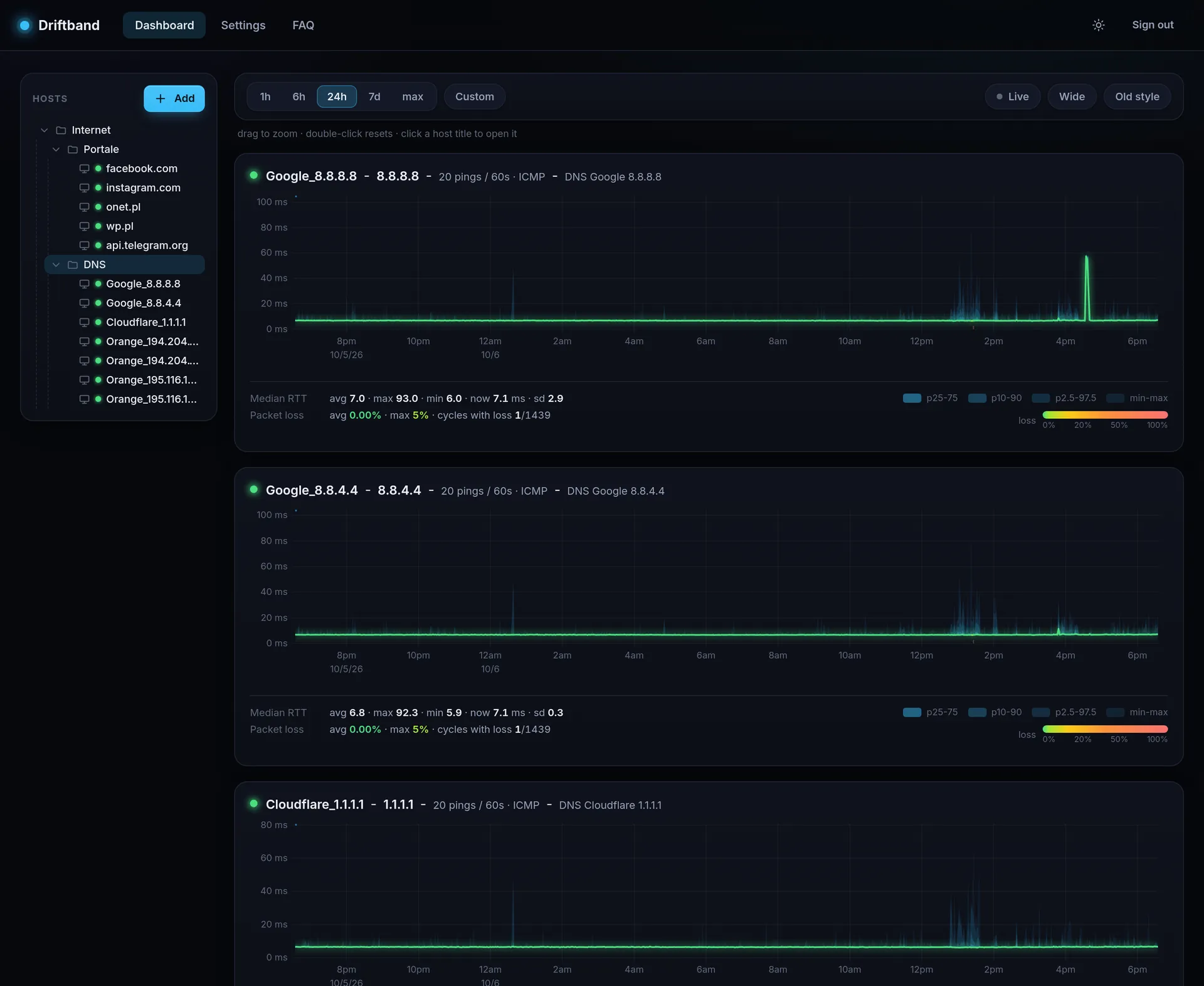
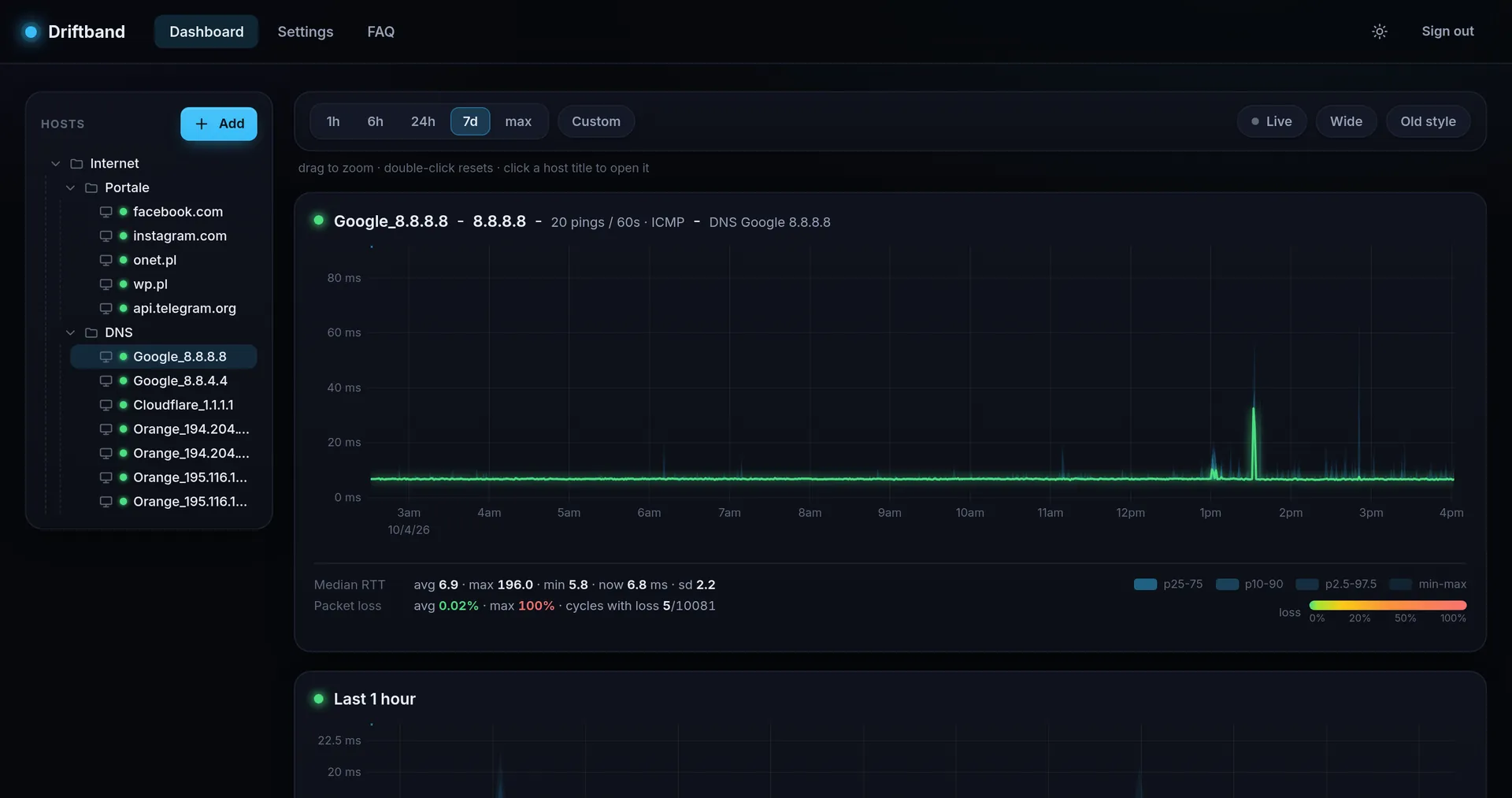
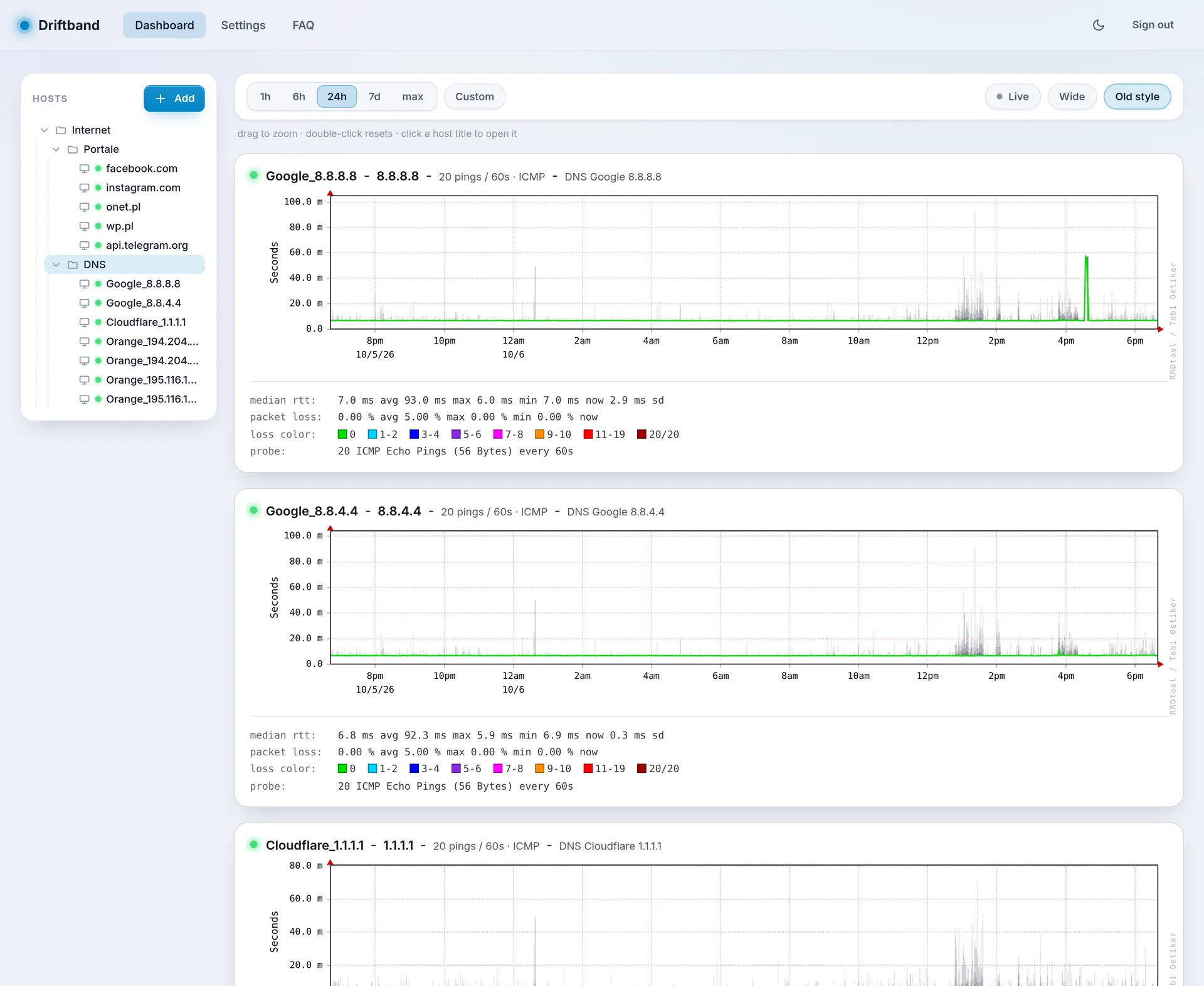
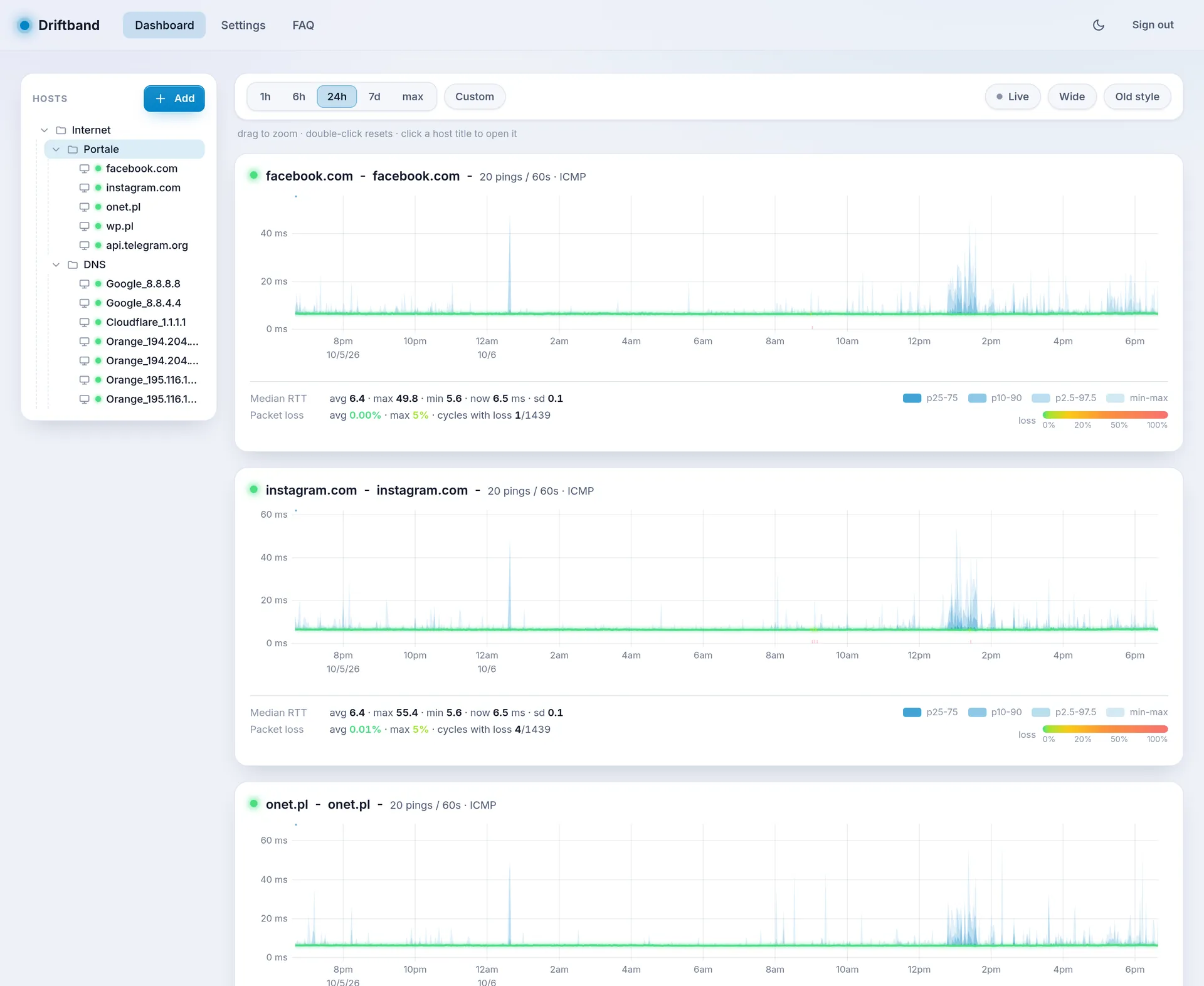
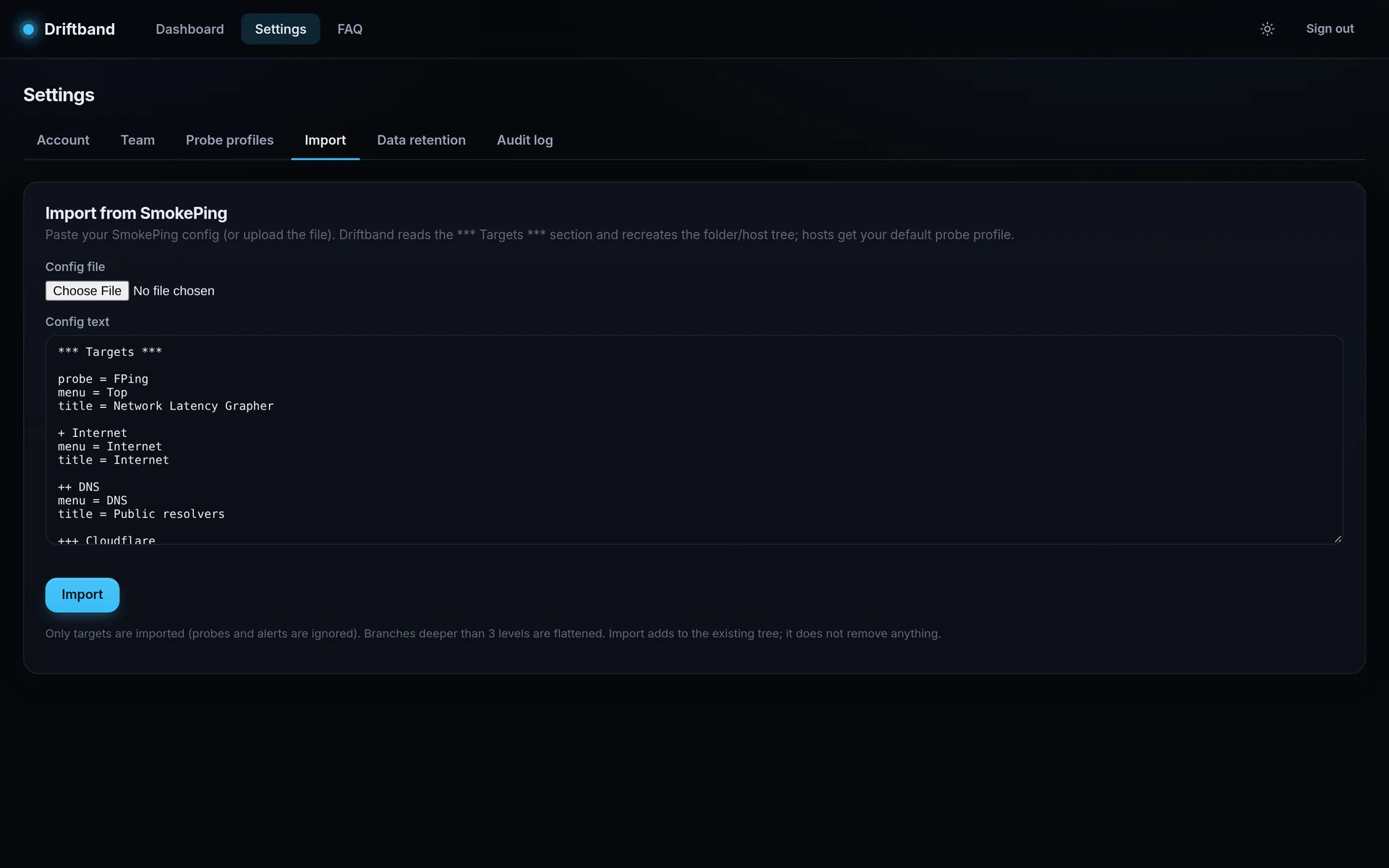
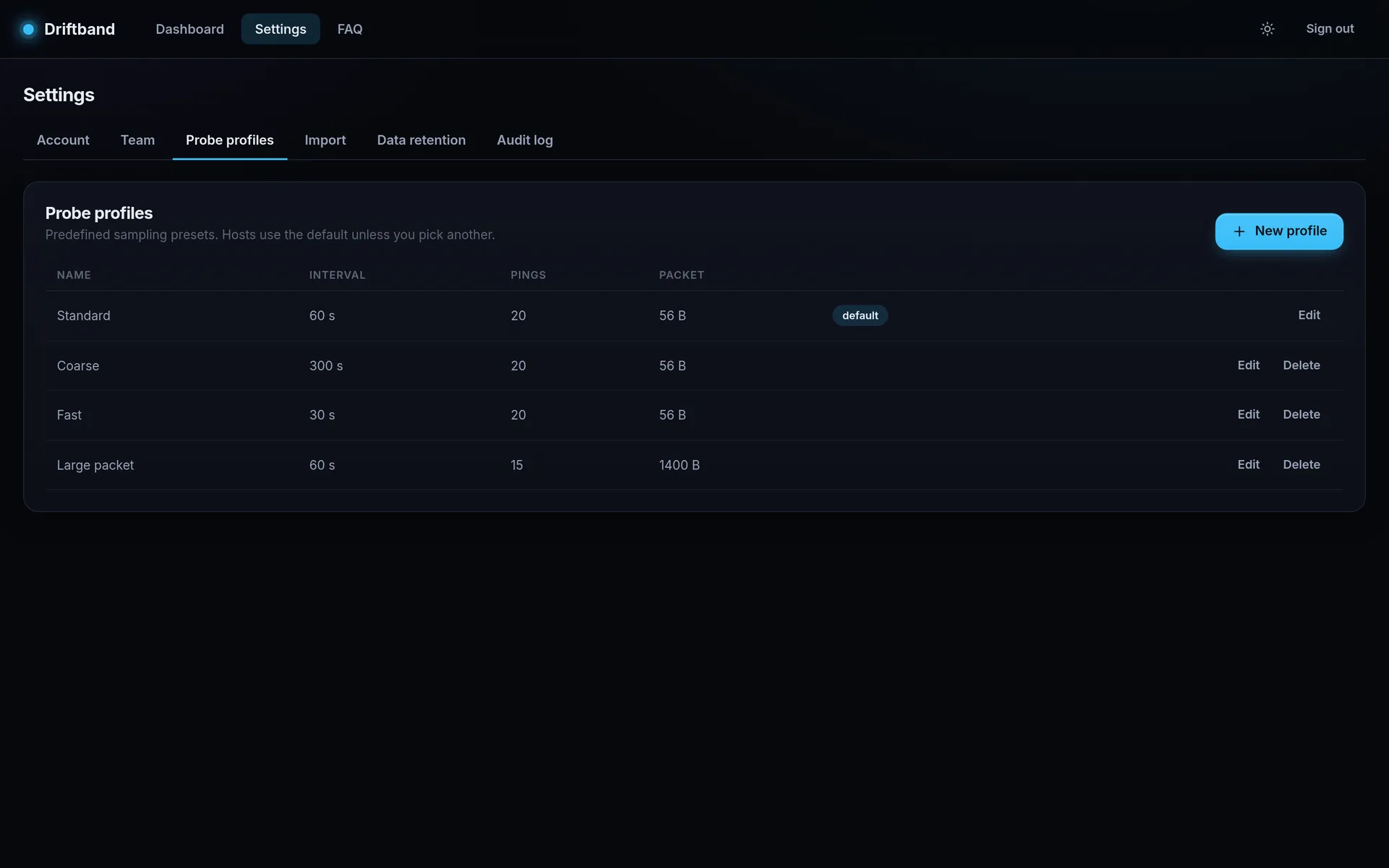
Captured from a production Driftband instance that watches public portals and DNS resolvers from Poland, every minute, for months.
03 / Features
Four nested bands (min-max, p2.5-97.5, p10-90, p25-75) around the median of every cycle, computed from every stored round-trip time.
The median changes colour with packet loss, a strip marks every lossy cycle, and the legend counts how many cycles lost anything.
1 hour to everything you have, or a custom from-to. Drag to zoom with full-resolution re-fetch, double-click to reset, and a Live mode that refreshes every 15 seconds.
Hover once, read every host at that moment. Average, max, min, now and standard deviation of the median, computed on the server over every cycle in the window.
A clean modern chart or a faithful SmokePing/RRDtool rendering, in a dark or light theme, in normal or wide layout.
Folders and hosts up to three levels deep, like +, ++, +++ in SmokePing. Drag and drop to reorder or move, collapse folders, open any node with a click.
Interval from 5 seconds, 1 to 100 pings per cycle (never more than the interval in seconds, so a cycle always finishes in time), packets of 12 to 1472 bytes, the most one Ethernet frame carries unfragmented. Four presets, your own profiles, one default, an override per host.
Paste or upload your config. The *** Targets *** hierarchy with host, menu and title becomes your Driftband tree. Only plain-text configs are accepted, and every address is checked before anything is created.
Telegram, Slack, Microsoft Teams and email. Loss or latency thresholds that must hold for a while, a lower recovery threshold, reminders and a flap guard. How it works
Each cycle runs fping -C and keeps every reply, so the distribution is real, not estimated. One container, no external collectors.
Separate tenants with their own hosts, profiles, alerts, retention and audit log. Owner, admin and member roles that owners and admins can switch at any time; single-use invite links that expire after 48 hours.
TOTP with any authenticator app or hardware TOTP key, QR enrollment and replay protection. Passwords hashed with Argon2id.
Every change, every sign-in, every failed sign-in and every refused permission check, with user, time and client IP.
Rate-limited sign-in, HttpOnly session cookies, a strict Content Security Policy, and an automated security test suite that covers every API endpoint.
Raw cycles plus 5-minute and 1-hour rollups, so a week or a year renders in milliseconds and your browser never chews through hundreds of thousands of points.
Keep 1, 2 or 3 years per organization. A housekeeper removes older data every day.
For whoever runs the instance: all organizations and users, blocking, password resets, a global audit log and a database growth forecast.
One Docker image and PostgreSQL. Your measurements stay on your servers.
04 / Migration
No rewriting years of carefully curated targets. Driftband reads the *** Targets *** section and builds the tree for you. Probes and alerts stay behind, every host gets your default profile, and branches deeper than three levels are flattened.
*** Targets ***
probe = FPing
menu  = Top

+ Internet
menu  = Internet

++ DNS
title = Public resolvers

+++ Cloudflare
menu  = Cloudflare 1.1.1.1
host  = 1.1.1.1

+++ Google
menu  = Google 8.8.8.8
host  = 8.8.8.8

++ Portals
+++ wikipedia
host  = wikipedia.org
Then drag, rename or re-profile anything from the web interface.
05 / Notifications
Get told when a link really is in trouble, and only once. Every rule waits for the problem to last, recovers on a lower threshold, and goes quiet when a link starts flapping instead of flooding your phone.
A bot posts to a private chat, a group or a channel. You need the bot token from @BotFather and the chat id.
An incoming webhook posts to the channel of your choice, with a link back to Driftband.
A Workflows webhook ("Post to a channel when a webhook request is received") receives an Adaptive Card, red for alerts and green for recoveries.
Any SMTP server with STARTTLS or TLS, signed in with a password or with OAuth 2.0, including a ready preset for Microsoft 365.
[ALERT] edge-router-01 (203.0.113.10): packet loss 62.0%
Packet loss has been at or above 20% for 5 min.
Rule: Core links · Organization: Acme

[RESOLVED] edge-router-01 (203.0.113.10): packet loss 1.2%
Back below 5% for 5 min.

[FLAPPING] branch-vpn: packet loss keeps crossing 20%
4 state changes in 60 min. Further alerts for this
host are paused until it is stable.
Secrets such as bot tokens, webhook URLs and SMTP passwords are stored encrypted and never shown again after saving.
06 / Why Driftband exists
I have run SmokePing almost since the day it appeared, on networks I built and looked after: data centers, offices, ISP and customer links. It is still one of the most honest tools in networking. It shows the whole distribution of latency instead of a comforting average, and once you have read a smoke graph you never want to go back.
Tobi Oetiker released SmokePing in 2001. In 2013 he announced SmokePing 3, a sponsored rewrite with a new web front end. It never shipped. The 2.x line still sees an occasional release, and plenty of people still rely on it every day. So do I.
But the world around it moved on. Teams share infrastructure. Customers want to see their own links and nobody else's. Security reviews ask about two-factor sign-in and audit trails. Editing a text file over SSH and guarding a CGI script with .htaccess no longer cuts it.
Driftband is what I wanted SmokePing 3 to be. The same smoke and the same honesty, with a web interface for everything, organizations and roles, two-factor sign-in, an audit log and a one-paste migration path. It does not reuse SmokePing code: it is a tribute, not a fork.

Tobi Oetiker publishes the first public release: an ICMP latency logger and grapher built on RRDtool.
The smoke graph becomes a staple of network operations.
A sponsored rewrite with a new web front end is announced. It is never released.
The 2.x line carries on with maintenance releases.
The latest release at the time of writing, still configured through text files.
Smoke graphs with a web interface, teams, 2FA and an audit log.
| SmokePing 2.x | Driftband | |
|---|---|---|
| Smoke graphs, loss colouring | Yes, the original | Yes, modern and classic style |
| Configuration | Text config file, reload the daemon | Web interface, drag and drop, SmokePing import |
| Charts | Static RRDtool images | Interactive: zoom, synced cursor, live refresh |
| Users and access control | Left to the web server | Built-in accounts, roles, invites |
| Multiple teams or customers | No | Isolated organizations |
| Two-factor sign-in | No | TOTP |
| Audit log | No | Every action, including failed sign-ins |
| Storage | Fixed-size RRD files | PostgreSQL with rollups, 1 to 3 years |
| Probe types | Many: FPing, DNS, HTTP, TCP, SSH and more | ICMP (fping) |
| Alerts | Pattern-based alerts by email or script | Telegram, Slack, Teams, email; hysteresis and flap guard |
| Distributed probing | Master and slaves | Not yet |
Try it first
Create a free organization on the public test instance and use everything: the host tree, smoke graphs, SmokePing import, notifications, teams and two-factor sign-in. It runs with a few limits so it stays fast for everyone.
07 / Self-host
Driftband ships as a single Docker image, lukmorawski/driftband on Docker Hub, and stores everything in PostgreSQL.
$ docker pull lukmorawski/driftband:0.1.0
Pin an exact version such as 0.1.0 in production; 0.1 follows patch releases and latest is the newest release. All tags on Docker Hub.
services:
  db:
    image: postgres:16-alpine
    restart: unless-stopped
    environment:
      POSTGRES_USER: driftband
      POSTGRES_PASSWORD: ${DB_PASSWORD:?set DB_PASSWORD in .env}
      POSTGRES_DB: driftband
    volumes:
      - dbdata:/var/lib/postgresql/data
    healthcheck:
      test: ["CMD-SHELL", "pg_isready -U driftband"]
      interval: 5s
      retries: 10

  driftband:
    image: lukmorawski/driftband:0.1.0
    restart: unless-stopped
    depends_on:
      db:
        condition: service_healthy
    environment:
      DATABASE_URL: postgres://driftband:${DB_PASSWORD:?set DB_PASSWORD in .env}@db:5432/driftband?sslmode=disable
      SECRET_KEY: ${SECRET_KEY:?set SECRET_KEY in .env}
    ports:
      - "8080:8080"
    # non-root image, no capabilities needed:
    # fping uses unprivileged ICMP sockets
    read_only: true
    cap_drop: [ALL]
    security_opt: ["no-new-privileges:true"]
    sysctls:
      net.ipv4.ping_group_range: "0 2147483647"

volumes:
  dbdata:
Put a database password and a secret key in .env, then start the stack:printf 'DB_PASSWORD=%s\nSECRET_KEY=%s\n' "$(openssl rand -hex 24)" "$(openssl rand -hex 32)" > .envdocker compose up -d
Open port 8080, register, and you are the owner.
Build the tree in the browser, or paste your SmokePing Targets under Settings, Import.
Generate invite links for admins and members. Turn on two-factor sign-in.
| DATABASE_URL | PostgreSQL connection string (required). |
| LISTEN | HTTP listen address, default :8080. |
| SECRET_KEY | 32-byte key (hex or base64) that encrypts notification secrets, kept outside the database. Created in step 1. |
| APP_URL | Public address of your Driftband, linked from notifications. |
| TRUSTED_PROXIES | CIDRs or addresses of your reverse proxy (and CDN, if any), so client IPs and HTTPS are detected correctly. Defaults to loopback and private ranges. |
For production, put Driftband behind a reverse proxy with HTTPS: session cookies are marked Secure automatically.
08 / FAQ
Driftband is a self-hosted network latency monitor. It pings your hosts on a schedule and draws smoke graphs: the full distribution of round-trip times as shaded percentile bands, with a median line coloured by packet loss. It runs as one Docker container next to PostgreSQL.
Driftband is inspired by SmokePing, created by Tobias Oetiker in 2001, and keeps its way of showing latency. It is a new implementation written in Go and JavaScript and contains no SmokePing code. It adds what SmokePing never had built in: a web interface for configuration, organizations and roles, two-factor sign-in and an audit log.
Yes. Paste your SmokePing config or upload the file. Driftband reads the *** Targets *** section, recreates the + / ++ / +++ folder and host hierarchy with host, menu and title, and attaches your default probe profile to every host. Probes and alerts are not imported, branches deeper than three levels are flattened, and the import only adds to your tree. Only plain-text configuration files are accepted (up to 2 MB and 1000 hosts per import); binary files, scripts and invalid host addresses are refused before anything is created.
ICMP echo round-trip time and packet loss. Each probe cycle runs fping in count mode and sends several pings to the host; Driftband stores every individual round-trip time, so it can show percentiles instead of a single average.
Yes, with probe profiles: the interval between cycles (5 seconds or more), the number of pings per cycle (1 to 100, and never more than the interval in seconds) and the ICMP packet size (12 to 1472 bytes, which is a 1500-byte Ethernet frame minus the IPv4 and ICMP headers). Every organization starts with Standard (20 pings every 60 s), Fast (every 30 s), Coarse (every 300 s) and Large packet (15 pings of 1400 bytes). You can create your own, mark one as the default and choose a profile per host.
The darkest band holds the middle 50% of pings, the lighter bands the middle 80% and 95%, and the faintest band the full range from fastest to slowest ping. The wider the smoke, the more jitter. The median line is green when nothing was lost and turns yellow, orange and red as loss grows; a strip along the bottom marks every cycle with loss.
Yes. Each organization has its own hosts, probe profiles, retention setting and audit log, fully isolated from other organizations. Owners and admins invite people with single-use links that expire after 48 hours, and can switch anyone except the owner between the admin and member roles at any time.
Passwords are hashed with Argon2id. Users can enable TOTP two-factor authentication with any authenticator app or hardware TOTP key, with replay protection. Sign-in and password confirmations are rate limited, sessions use HttpOnly cookies, and every action, including failed sign-ins and refused permission checks, is written to the audit log. An automated security test suite covers every API endpoint.
Each probe cycle is stored with all of its round-trip times, plus 5-minute and 1-hour rollups for fast long-range charts. On a production instance this costs about 370 bytes per cycle, so one host with one cycle per minute needs roughly 190 MB per year. Each organization keeps 1, 2 or 3 years of history; older data is removed automatically.
Telegram (a bot posting to a chat, group or channel), Slack (an incoming webhook), Microsoft Teams (a Workflows webhook that receives an Adaptive Card) and email over any SMTP server with STARTTLS or TLS, signed in with a password or with OAuth 2.0 client credentials, including a ready preset for Microsoft 365. One rule can notify several channels, and every channel has a test button.
A rule measures packet loss or median latency over the last few probe cycles, so a single bad cycle never counts. The condition must then hold for the number of minutes you set before anything is sent. Recovery uses a lower threshold with its own duration, so a link hovering around the limit does not alternate between alert and recovery. If the state still changes too often within a window, Driftband sends one flapping notice and stays quiet until the link has settled. Gaps without measurements never complete a condition.
Owners and admins of an organization create and edit channels and alert rules; members can see them, the active alerts and the delivery history. Bot tokens, webhook URLs, SMTP passwords and OAuth client secrets are stored encrypted and are never shown again after saving. Every change is recorded in the audit log.
Not yet. Driftband measures ICMP round-trip time and packet loss with fping. If you depend on DNS, HTTP or TCP probes, SmokePing still covers those cases.
Yes. The public test instance at https://test.driftband.app has every feature. Each organization there can have up to 10 hosts, probe intervals of at least 60 seconds and ICMP packets of at most 56 bytes. A self-hosted Driftband has none of these limits; its administrator can set a host limit per organization if needed.
With Docker Compose: run the lukmorawski/driftband image, pinned to a version tag such as 0.1.0, next to PostgreSQL 16, open the web interface and create your organization. The image runs as a non-root user and needs no extra Linux capabilities: fping uses unprivileged ICMP sockets. Put it behind a reverse proxy with HTTPS for production. The compose file above is all you need.
Driftband is free, self-hosted software licensed under the GNU Affero General Public License v3.0 (AGPL-3.0). There is no usage limit and no telemetry. If you run a modified version as a network service, the AGPL asks you to offer its source code to your users.
09 / Start
Free, self-hosted, AGPL-3.0. Import your SmokePing targets and see the shape of your latency in five minutes.
10 / Partners

IT consulting and managed services: cybersecurity, IT audits, infrastructure administration and monitoring.
Visit site vuln.today
Daily CVE vulnerabilities with AI analysis, priority scores, EPSS, CVSS, KEV and patch monitoring.
Visit site
Website monitoring around the clock: uptime, SSL certificates, domain renewals and email security, with alerts written in plain language.
Visit site